edjing Mix - Music DJ app
- 4.6
- Rating
- 100.00M
- Installs
- Free
- Price

 Analysis by App-foxy
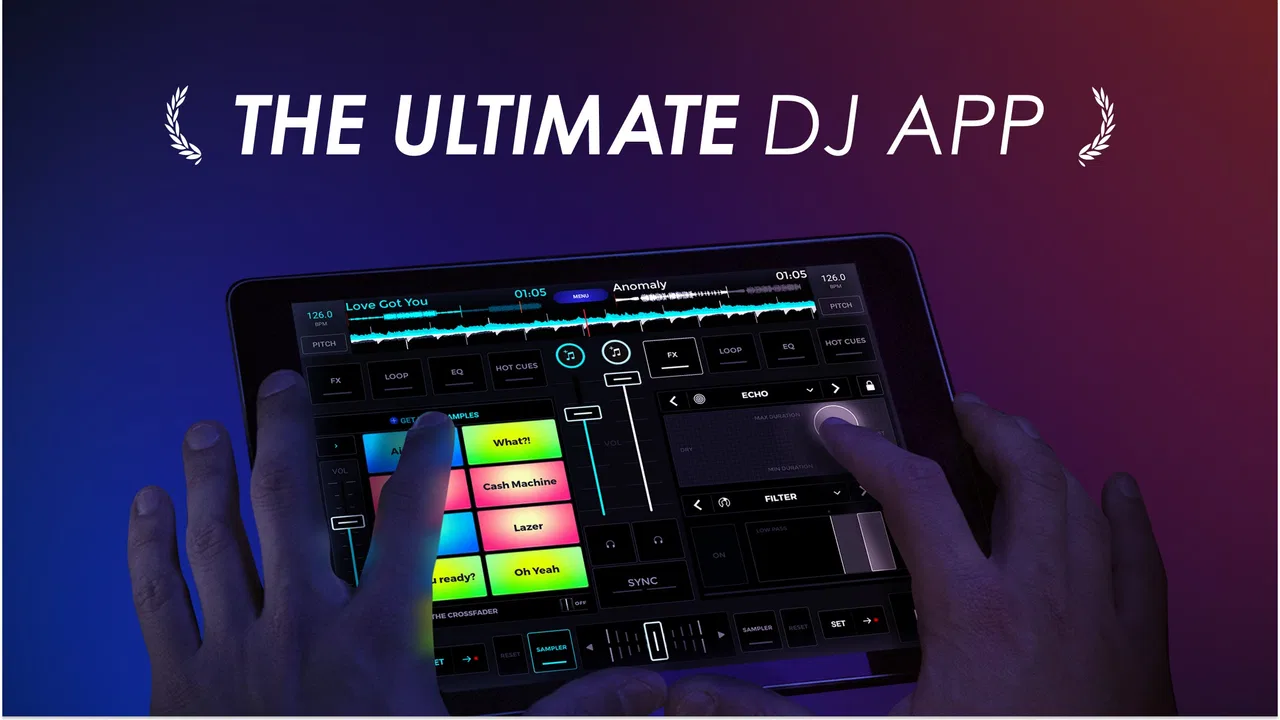
I enjoy music apps that let me do something immediately instead of making me study a manual first. edjing Mix - Music DJ app takes that approach by turning an Android or iOS device into a compact DJ workspace for mixing tracks, recording sets, and experimenting while away from a full computer setup. I found it most appealing as a hands-on tool for quick practice, casual parties, and anyone curious about DJ techniques without buying dedicated equipment first.
It is a free Music & Audio app from MWM - AI Music and Creative Apps, with optional in-app purchases ranging from $0.99 to $114.99 per item. The app is rated for Everyone, so its basic audience is broad, although the actual experience depends more on patience, musical interest, and the capabilities of your phone or tablet than on age. Its long presence in the mobile music space is reflected in its release date of Nov 14, 2012, while version 7.29.01 shows that it continues to be maintained.
Getting past the first points of friction
The first surprise is that a DJ app can feel more complicated than a normal music player. A music player asks me to choose a song and press play. A mixing app asks me to think about two decks, timing, transitions, levels, and the difference between monitoring a track and sending it to the main output. That is not a flaw in edjing Mix, but it does mean that a new user can feel lost before making a satisfying mix.
In-Depth Coverage of edjing Mix - Music DJ app
I recommend beginning with two familiar songs that have a steady beat and a clear structure. Do not start with a playlist full of very different genres. The goal of the first session should be learning the relationship between the decks, not creating a perfect performance. Load one track, let it play, then bring in the second at a low level. This simple exercise makes the central workflow easier to understand than tapping every control at once.
Another common sticking point is expecting the app to behave like a desktop DJ program. A phone screen has limited space, so controls are compact and gestures matter. Buttons that seem obvious after a few minutes may not be obvious during a first attempt, especially when a finger covers part of the interface. I found it better to pause and explore one area at a time: track loading, playback, tempo, the crossfader, and recording.
The most useful beginner habit is to treat the first few sessions as rehearsals, not performances. I would spend a few minutes moving the crossfader slowly, adjusting volume, and starting or pausing each deck before attempting a transition. This reduces accidental jumps and makes it easier to understand which control caused a change in the sound.
What to check before blaming the mixer
When a song does not appear where I expect it, the problem may be the way music is stored or exposed on the device rather than the mixing interface itself. I first check that the track is available in the device’s ordinary music library and that it can play outside the app. If it cannot play there, edjing Mix is unlikely to solve the underlying issue.
I also check whether another app is already using audio output. Music players, video apps, calls, and wireless audio connections can all affect what I hear. Closing unrelated audio apps and reconnecting the preferred headphones or speaker is a sensible first step. If the sound is delayed, the wireless connection may be contributing to the problem, which matters when trying to match beats by ear.
Before practicing seriously, I make sure there is enough free storage for recordings and that the device is not overloaded with other demanding tasks. I also lower the volume before testing a new track. This is especially important with headphones because two loaded decks can produce a much louder result than a single music player.
People often ask whether the app is suitable for a quick, casual mix without extra equipment. In my experience, yes, that is where it makes the most sense. I can use the touchscreen to experiment with transitions and record a short result without carrying a controller. However, the smaller display is less comfortable for long sessions, and physical jog wheels remain easier for precise, repeated performance.
A practical setup for a first session
For a reliable first attempt, I would use a charged device, wired headphones if available, and two tracks with similar energy. Wireless headphones can be convenient, but audio delay makes timing more difficult. I would also choose a quiet place, because listening carefully to two layers of music is harder when there is background noise.
Next, I would load the first song and let it play long enough to identify its rhythm. Then I would load the second track and bring its volume in gradually. Rather than trying to match everything manually, I would listen for whether the beats feel like they are moving together or fighting each other. If the sound becomes muddy, lowering one deck is often more useful than immediately changing several effects.
Recording a short test is another worthwhile check. A transition may feel fine while I am concentrating on the controls but sound unbalanced when played back. Listening to the recording helps reveal sudden volume changes, long silent gaps, or a second track entering too early. This is one of the app’s strongest practical uses: it turns casual experimentation into something I can review and improve.
The free entry point is helpful, but I would not assume that every tool or content option is included without checking the current in-app presentation. Optional purchases can change the cost of using the app more deeply, and the listed purchase range is wide. I would first learn the basic workflow and decide whether I actually need additional options before spending money.
Recovering when a mix goes wrong
A failed transition does not usually mean the whole session is lost. If the incoming track is too loud, I lower its deck rather than stopping everything. If the beats drift, I reduce the transition to a simple fade and restart the second song at a clearer point. The important recovery skill is knowing when to simplify instead of trying to repair several problems simultaneously.
You May Also Like

 AliExpress - Shopping App
AliExpress Makes Global Shopping Feel Personal, but Shoppers Bear the Risk
AliExpress turns a global marketplace into a pocket-sized discovery engine. Its reach is useful, its shopping loop compelling, and its trade-offs easy to miss.

 Lords Mobile: Kingdom Wars
Lords Mobile Is a Kingdom-Building Routine, Not a Quick Match
A case-by-case verdict on the building, battles, device demands, and social commitments that make Lords Mobile rewarding for some players and exhausting for others.

 PDF Scanner app - TapScanner
TapScanner Makes Paperwork Easier to Capture, Check, and Share
TapScanner makes scanning with a phone feel less like a rescue operation and more like a dependable step in getting work done. Its capture tools are useful, though not flawless.

 Block Blast!
 Shows How Much a Puzzle Game Can Leave Out
A quiet grid game shows why puzzle players increasingly value instant clarity, repeatable skill and low-pressure play—and where the genre still needs to catch up.
 Family Space
 Review: A Shared Routine That Makes Family Life Easier
A parenting app earns its place not by adding more noise, but by making everyday coordination easier. Family Space gets that balance mostly right.

 1Weather Forecasts & Radar
 Makes the Daily Check Worthwhile
A good forecast does more than predict rain. This week's pick turns changing conditions into a clear, practical reason to check before you step outside.
More From Our News Desk
View All News


When playback stops unexpectedly, I check the obvious causes in order: whether the deck is paused, whether the device has switched audio output, whether another app has taken control of sound, and whether the track itself plays normally outside edjing Mix. Restarting the app can help after a temporary glitch, but I would not begin by deleting recordings or changing many settings at once. A controlled check makes it easier to identify the real cause.
If a recording sounds different from the live mix, I compare the monitoring setup with the main output. Headphones can make me focus on details that are less noticeable through a speaker, while a small speaker can hide bass or make the overall result seem quieter. I also listen for clipping caused by pushing both decks too high. Turning down the individual tracks usually gives a cleaner result than relying only on the master volume.
One useful workflow is to record in short sections. Instead of attempting a long set immediately, I make a brief transition, listen back, and then try again with one change. This approach saves time and produces clearer feedback. It also helps when storage or battery life is limited, because I am not creating several long recordings while still learning the basics.
For a small gathering, I would prepare the music before people arrive. I would test each selected track, arrange a simple sequence, and record a backup mix if the occasion matters. A phone is convenient, but it is not as forgiving as a dedicated setup when something goes wrong in front of an audience. Preparation matters more than adding flashy effects.
Where touchscreen control helps and where it does not
The touchscreen is excellent for portability. I can practice on a sofa, in a rehearsal room, or while traveling, and I do not need to unpack a controller. It also encourages experimentation because the barrier between idea and action is low. For a beginner, that immediacy is valuable: I can hear the result of moving a control almost instantly.
The trade-off is precision. A finger is not a jog wheel, and a phone screen does not provide the same tactile separation as physical knobs and faders. During a fast transition, I may touch the wrong area or move a control farther than intended. The app is therefore better for learning concepts, rough mixes, and casual performance than for demanding, highly precise work.
I would also be cautious about using it as my only preparation tool for a serious live set. It can help me understand song structure and transition timing, but a computer-based DJ application or hardware controller is usually more comfortable for organizing a large library and making repeated adjustments. edjing Mix has a different strength: it keeps the creative process close at hand.
The app’s scale is one reason it has reached over 100 million installs and earned an average rating of 4.5 from around 1.6 million ratings. Those figures suggest broad appeal, but they do not remove the need to match the tool to the user. A popular mobile mixer can still feel cramped to someone who already works with professional equipment, while it may be exactly right for someone taking the first step into DJing.
When the phone, files, or audio connection are the real issue
It is easy to blame the app when the actual problem is a device setting. If music plays normally in other apps but not here, checking the selected output and restarting the session is sensible. If every audio app behaves strangely, I would investigate the phone’s volume, connection, storage, and background activity before changing anything inside the mixer.
Track availability can also depend on how the music was obtained and stored. I would use files that are genuinely accessible through the device’s music library and avoid assuming that every song visible in another service can be handled like an ordinary local track. This distinction is important because streaming libraries and downloaded files do not always behave the same way in third-party creative tools.
Battery management matters more than I expected. A screen that stays active while audio plays can drain a phone during a long session, and a device that becomes warm may reduce background activity or performance. For extended practice, I would start with a good charge, close unnecessary apps, and keep the session shorter if the device begins struggling.
There is also a human cause: poor song pairing. Two tracks can both sound good alone but clash when combined because their rhythms, vocals, or low frequencies occupy the same space. No troubleshooting step can fully fix an unsuitable pair. Choosing tracks with compatible energy and leaving room between vocal sections often improves the result more than adding another effect.
Users sometimes ask whether a high rating guarantees a smooth experience on every device. It does not. The app is used across many phones and tablets, and performance can vary with screen size, operating system behavior, audio hardware, and the way music is organized. I would judge it after testing the exact device and the music I plan to use, not only by its store reputation.
Who will enjoy it most
I would recommend edjing Mix to curious beginners, casual DJs, travelers, and creators who want to sketch a mix without carrying a laptop. It is particularly useful for learning the basic language of DJing: two decks, gradual transitions, level control, tempo awareness, and recording for self-review. It can also suit someone who wants to entertain friends occasionally rather than build a full professional rig.
It is less suitable for a user who needs extensive library management, exact tactile control, or a dependable centerpiece for demanding events. In those cases, a desktop DJ application paired with a controller is the better choice. A standard music player is also better if the goal is simply listening to albums without mixing or recording.
The age rating of Everyone makes the app broadly approachable, but younger users still benefit from supervision around purchases, headphones, and public performance. The free price makes trying it easy, while optional purchases mean I would review each purchase screen carefully and avoid paying for features before understanding how often I will use them.
What I appreciate most is that the app supports a gradual learning path. I can begin with a fade between two songs, then work on timing, then record and critique the result. That progression feels more useful than an interface that overwhelms me with advanced controls from the first tap. The limitation is that the same compact design can become restrictive as my ambitions grow.
My practical verdict after using it
edjing Mix works best when I treat it as a portable practice studio rather than a complete replacement for professional DJ hardware. It makes the first experiments approachable, gives me a way to record short mixes, and is convenient for spontaneous ideas. The app is free to start, available for a broad audience, and developed by MWM - AI Music and Creative Apps, with a current version of 7.29.01.
My advice is to test it with two accessible tracks, wired headphones if possible, and a short recording. Check the device’s audio output, confirm that the music plays normally elsewhere, and keep the first transition simple. If the result is clean and the touchscreen feels comfortable, the app can become a genuinely enjoyable creative tool.
If you want precise physical control, large-scale organization, or a polished professional performance workflow, I would move to a computer and controller sooner rather than later. If you want to learn the foundations, make a quick mix at home, or explore DJing before investing in equipment, I think this app is worth trying. My final impression is positive, with one clear condition: its value comes from hands-on practice, not from expecting a phone to behave like a full DJ booth.
With around 54 thousand written reviews and more than 100 million installs, it is clearly not a niche experiment. Still, the best reason to use it is personal and practical: it lets me turn a spare moment and a small music library into an opportunity to practice. For that purpose, it earns a place among the more approachable mobile options in its category.
FAQs for edjing Mix - Music DJ app
01What features does edjing Mix offer for beginners?
edjing Mix provides an intuitive interface that makes it easy for beginners to start mixing. It includes features like an automatic BPM detection, crossfade, and a beginner-friendly DJ school. This helps users learn the basics of mixing and DJing without feeling overwhelmed by more advanced tools.
02Can I use edjing Mix with external hardware?
Yes, edjing Mix supports a variety of external DJ controllers, offering a more professional experience. Compatible devices include the Mixfader and other popular controllers, allowing for tactile control over your mixes. This feature is great for users who want to take their DJing to the next level.
03Is edjing Mix free to use?
edjing Mix is available as a free download, but it offers in-app purchases and subscriptions for premium features. The free version provides basic mixing tools, while the premium version unlocks additional features like advanced audio effects, sampler packs, and more precise control over your mixes.
04How does edjing Mix integrate with music streaming services?
edjing Mix integrates seamlessly with music streaming services like SoundCloud and TIDAL, allowing users to access millions of tracks directly within the app. However, availability may depend on your subscription plan with these services, and some features may require an internet connection.
05What are the system requirements for edjing Mix?
edjing Mix is available for both Android and iOS devices. For optimal performance, it's recommended to have a device running Android 5.0 or later, or iOS 11.0 or later. Sufficient storage and processor speed are also important to ensure smooth operation, especially when using advanced features.
Pros
- User-friendly interface for beginners.
- Broad range of sound effects available.
- Integrates smoothly with major music platforms.
- Offers intuitive music mixing tools.
- Regular updates with new features.
Cons
- Some features require in-app purchases.
- Occasional lag on older devices.
- Ads can be intrusive at times.
- Limited free track availability.
- Requires internet for full functionality.

edjing Mix - Music DJ app
Gallery